
RAID Rebuild vs. Backup: What Each One Can—and Cannot—Recover
Published 2026-09-03 | JiWang Data Recovery Technical Team
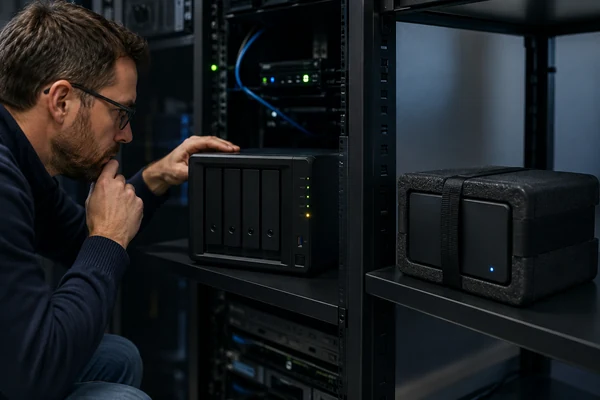
A RAID rebuild restores array redundancy after a supported drive failure. A backup restores data from an independent copy. They solve different problems: rebuilding cannot undo deletion, ransomware, file-system corruption, or an incorrect rebuild, while a usable backup can provide an earlier clean version.
The short answer
- Use a rebuild when the array configuration is known, the remaining members are healthy, and the failure is within the RAID level's tolerance.
- Use a backup when you need an independent copy, an earlier version, or recovery from events that affected the entire array.
- Stop both repair and rebuild attempts when multiple disks are unstable, the member order is uncertain, or the only copy of important data is at risk.
The safest sequence is usually evidence first, recovery second, redundancy last. Capture the configuration and logs, protect the original media, recover essential data to separate storage, and only then restore the production array.
What a RAID rebuild actually does
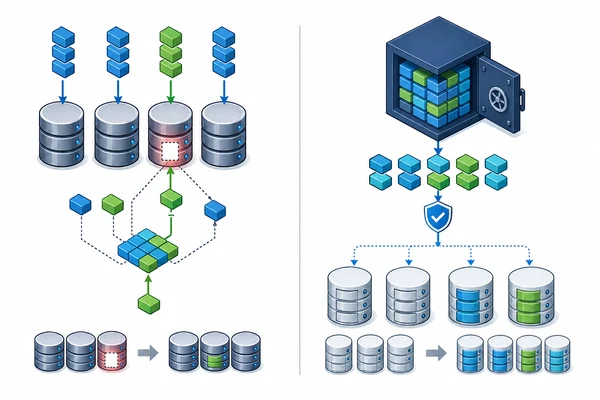
RAID distributes data and redundancy information across multiple drives. When one supported member fails, a controller or storage system may reconstruct the missing content onto a replacement drive by reading every surviving member.
That process can restore redundancy, but it places sustained load on the remaining drives. If another member has unreadable sectors, intermittent connectivity, or a developing mechanical problem, the rebuild may stop or produce an incomplete result. A rebuild is therefore not a neutral diagnostic test.
Vendor instructions also depend on the exact platform. Synology's repair documentation, for example, requires users to check the storage pool state and install enough compatible replacement drives before starting repair. Microsoft documents distinct Storage Spaces states such as degraded, incomplete, and read-only. Those states require different responses; the word “degraded” alone is not a complete diagnosis.
What a backup does differently
A backup creates another recovery source outside the active array. A well-designed backup can retain versions from before accidental deletion, corruption, or malicious encryption. It can also be isolated from the credentials and systems used to administer production storage.
Synology explicitly states that RAID is not a backup and recommends a 3-2-1 strategy: at least three copies, on two types of media, with one copy stored off-site. CISA similarly recommends offline, encrypted backups and regular tests of backup availability and integrity.
The word “backup” is not enough by itself. A continuously mounted replica may receive the same deletion or ransomware changes as the source. A job that reports success may still contain unreadable, incomplete, or application-inconsistent data. Recovery must be tested.
Five incidents that rebuilding cannot solve
Accidental deletion
If a user deletes a folder, the array may remain perfectly healthy. Rebuilding a healthy array simply reproduces its current state, including the deletion. Versioned backup or file-system snapshots are the relevant recovery sources.
Ransomware
RAID protects availability during certain hardware failures, not against authorized writes made by compromised software. Encrypted files can be mirrored or striped normally across every member.
File-system corruption
Parity can confirm or reconstruct blocks at the RAID layer, but it does not understand every directory entry, database transaction, or application record. Rebuilding may reproduce corrupted logical structures.
Controller or configuration mistakes
Wrong member order, stripe size, offset, parity rotation, or enclosure metadata can make intact disks appear unreadable. Initializing or forcing a rebuild with guessed parameters may overwrite useful metadata.
Fire, flood, theft, or power events
All drives in one enclosure share a physical location and often a power path. An off-site or properly isolated backup addresses a different failure domain.
When you should stop a rebuild
Stop and reassess if more drives become missing, a surviving hard drive develops repeated clicking or grinding sounds, read errors increase quickly, the member order is uncertain, or the system proposes initialization instead of a clearly defined repair.
Seagate advises immediately powering down a drive that makes grinding noises and treats repeated regular tapping, beeping, or clicking as potentially abnormal. Continued full-disk reads during a rebuild can worsen a physical problem.
Before any further attempt, record drive serial numbers, bay positions, controller model, RAID level, file system, event logs, and every action already taken. Do not alter the original members merely to see whether another configuration works. For high-value data, sector-level images or clones should be created in an order based on drive condition, and reconstruction should be attempted on copies.
A practical recovery decision path
- Determine whether the issue is a failed member, missing metadata, file-system damage, deletion, encryption, or a broader system compromise.
- Confirm whether a separate, recent, and tested backup exists.
- Preserve configuration records and label every physical member.
- If a disk is unstable, prioritize controlled imaging rather than a production rebuild.
- Recover critical files to separate storage and validate them.
- Repair or recreate the array only after the data risk is controlled.
This order separates data recovery from service restoration. In a business incident, both may be urgent, but they are not the same objective.
Sources
- Synology: Repair a storage pool
- Synology: RAID is not a backup
- Microsoft: Storage Spaces states
- CISA: StopRansomware Guide
- Seagate: Internal hard drive troubleshooting
Sources checked September 3, 2026. Product procedures vary; follow the documentation for the exact controller, enclosure, and software version in use.
Frequently Asked Questions
Does RAID 5 count as a backup?
No. RAID 5 can tolerate one member failure under normal conditions, but it does not provide an independent historical copy.
Should I replace a failed disk and click Rebuild immediately?
Only after confirming the configuration, the health of surviving members, and the existence of a usable backup. If the only copy is on the array, immediate rebuilding can add risk.
Can snapshots replace backups?
Snapshots are valuable for fast rollback, but snapshots stored in the same administrative and physical failure domain should not be the only recovery method.
Why can a rebuild take so long?
The system may need to read all surviving data and write an entire replacement member while serving normal workload. Capacity, errors, throttling, interface speed, and workload all affect duration.
Can data be recovered after a failed rebuild?
Sometimes, but the result depends on what was overwritten and the condition of each member. Stop repeated attempts and preserve the current state for assessment.